
Overview
This article explains how to use the Offset from line tool in the Kinsman SitePoint app. The tool uses an existing reference line to help you locate positions at a specific perpendicular distance from that line.
Use Offset from line for common layout and measurement tasks, including establishing square corners, finding the midpoint of a line, and locating points at a known offset.
Before You Begin
Before you start, make sure you have:
Selected your work profile.
Connected your base and rover.
Opened a new or existing project.
Created or localized your control point.
Step-by-Step Instructions
Step 1 — Create Your Reference Line
Start by identifying the two points that will define your reference line.
Your reference line could represent:
A property line.
The side of an existing building.
The first side of a concrete pad or foundation.
Any other line you want to measure from.
Using your rover, drop a point at each end of the reference line.
Step 2 — Open Offset from line tool
Tap Tools at the bottom of the screen.
Scroll to the Measure section and tap Offset from line.
Step 3 — Select Your Reference Points
Tap the first point of your reference line. This becomes Point A.
Next, tap the second point. This becomes Point B.
The line between Points A and B is now your reference line.
Step 4 — Read the Measurements
Once you select Points A and B, the app displays measurement information based on your rover's current position.
You'll see two measurements:
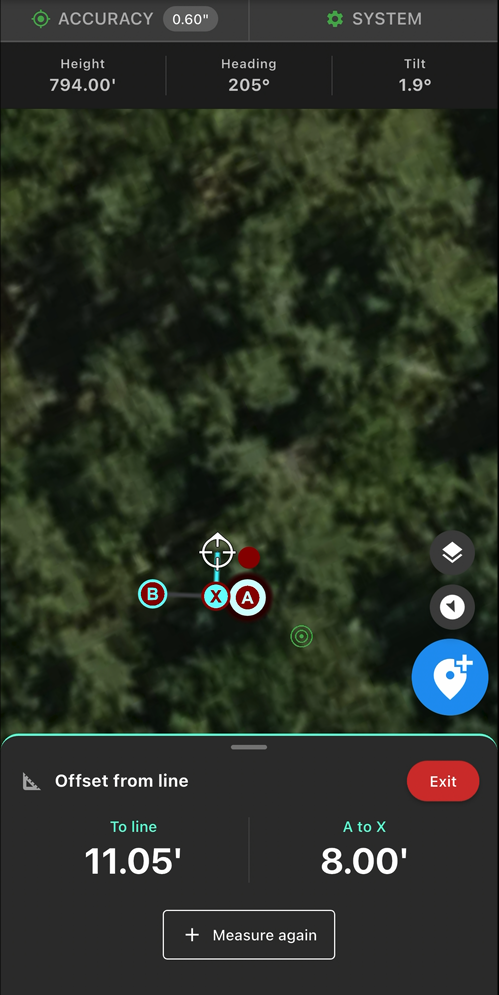
To line — Shows the perpendicular distance between your rover and the reference line. X represents the point on the reference line that is perpendicular to your rover's current position.
A to X — Shows the distance along the reference line from Point A to X.
As you move your rover, these measurements update in real time.
You can also tap Point B to change the along-line measurement from A to X to B to X.
Common Uses
Lay Out Points Offset from a Building
One of the most common uses for this tool is laying out points at a specific distance from a building or other existing feature.
For example, if you're installing sonotubes for a deck that need to be 10 feet from the side of a house and spaced 8 feet apart, use two points along the house to establish your reference line.
(Pictured below)
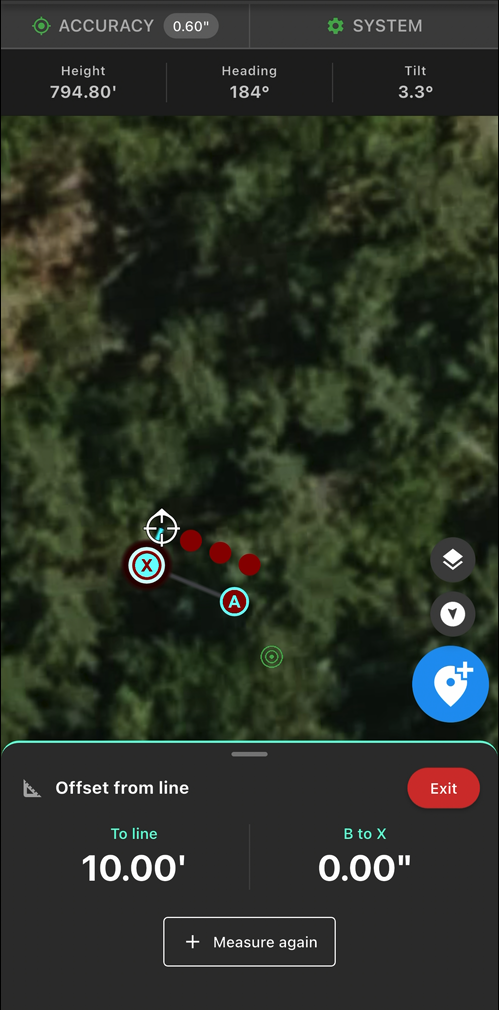
As you move with the rover, use the To line measurement to stay exactly 10 feet from the house and A to X measurement to measure the 8-foot spacing along the reference line.
Lay Out a Square Pad
Offset from line can also be used to establish square corners.
For example, suppose you're laying out a 24 × 24-foot concrete pad for a garage.
Start by dropping points at the first two corners to establish one 24-foot side of the pad. Use those points as A and B in Offset from line.
Walk away from the reference line with your rover. The To line measurement tells you when you're exactly 24 feet perpendicular to the line, while A to X or B to X helps you stay aligned with the correct corner.
Once you're at the correct location, drop your third point. Repeat the process from the opposite corner to establish the fourth point.
This gives you a fast way to lay out a square pad without pulling multiple tape measures or manually using the 3-4-5 method.
Find the Center of a Line
You can also use Offset from line to locate the midpoint of a reference line.
As you move with your rover, use the A to X or B to X measurement to locate the desired distance along the line without pulling a tape.
Was this article helpful?
That’s Great!
Thank you for your feedback
Sorry! We couldn't be helpful
Thank you for your feedback
Feedback sent
We appreciate your effort and will try to fix the article